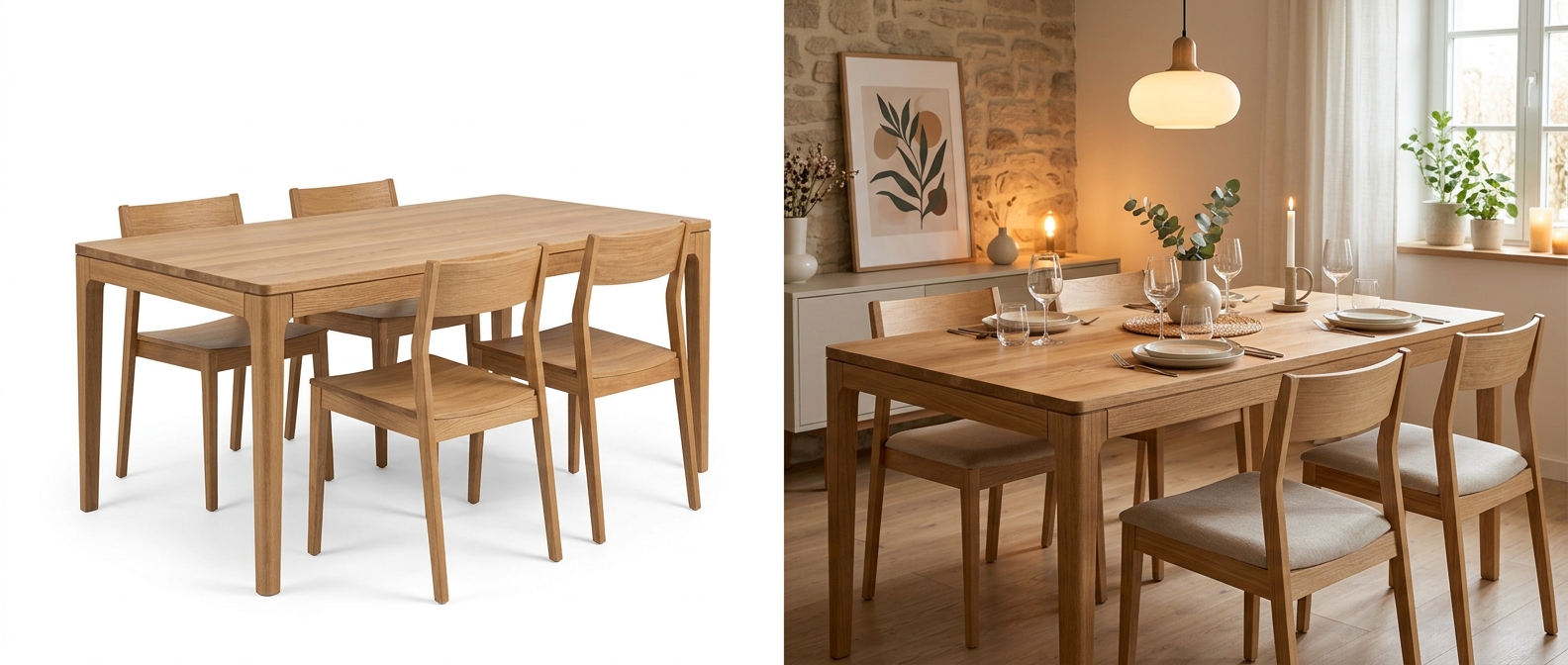
Amazon is the undisputed leader in online furniture sales. In 2025, the platform captured over 35% of all online furniture transactions in the United States, with furniture and home furnishing revenue exceeding $28 billion annually. For furniture sellers, Amazon is not optional — it is the single largest channel for reaching buyers.
But competition on Amazon is fierce. A search for "mid-century modern sofa" returns thousands of results. The difference between a listing that sells and one that languishes on page four often comes down to a single factor: image quality.
of all US online furniture sales happen on Amazon
Marketplace Pulse 2025
of Amazon shoppers say images are the #1 factor in purchase decisions
Jungle Scout Consumer Report
higher conversion for listings with 7+ optimized images
Jungle Scout Seller Data
Amazon's A10 algorithm weighs multiple factors in search ranking, but click-through rate and conversion rate are among the heaviest. Both are directly influenced by image quality. A listing with crisp, professional imagery earns more clicks from search results, and once a shopper lands on the page, high-quality lifestyle and detail images keep them engaged long enough to buy.
This guide covers every image requirement Amazon enforces for furniture listings in 2026, from main image specs to A+ Content modules to product video — and shows you how to meet each one efficiently.
Amazon image requirements for furniture: exact specifications
Amazon has strict image requirements, and non-compliant images are automatically rejected or suppressed. Here is every specification you need to know for furniture listings.
Main image (MAIN)
Additional images (up to 8 slots)
Amazon allows up to 9 total images per listing (1 main + 8 additional). For furniture, the recommended image set includes:
| Slot | Image Type | Purpose | Specs |
|---|---|---|---|
| 1 (MAIN) | White background | Search result thumbnail | 2000x2000, white bg, 85% fill |
| 2 | Lifestyle scene | Room context, scale reference | 2000x2000, styled room |
| 3 | Alternate angle | Side or 3/4 view | 2000x2000 |
| 4 | Detail close-up | Fabric, wood grain, hardware | 2000x2000 |
| 5 | Dimension graphic | Height, width, depth overlay | 2000x2000, clean lines |
| 6 | Lifestyle (different style) | Appeal to broader audience | 2000x2000, different room |
| 7 | Infographic | Features, materials, specs | 2000x2000, text + images |
| 8-9 | Comparison / back angle | Additional perspectives | 2000x2000 |
Amazon's A10 algorithm gives ranking preference to listings with 7+ images. Furniture sellers who fill all 9 slots see an average 60% higher conversion than those with only 3-4 images. — Jungle Scout Seller Data 2025
A+ Content: Enhanced Brand Content for furniture
A+ Content (formerly Enhanced Brand Content) is Amazon's premium listing format that allows brand-registered sellers to add rich media modules below the standard product description. For furniture, A+ Content is not optional — it is a conversion multiplier.
average sales lift from A+ Content
Amazon Internal Data
Premium A+ Content adds video, interactive modules, and carousel
Available to Brand Registry sellers
The most effective A+ Content modules for furniture are:
Standard Image & Text Overlay
Image size: 970 x 600px. Use lifestyle scenes showing the product in context. Overlay text highlighting key features (e.g., "Solid oak frame, 10-year warranty").
Comparison Chart Module
Image size: 150 x 300px per product. Compare your product variants side by side — 2-seater vs. 3-seater, fabric vs. leather. Each cell gets a small product image.
Standard Four Image & Text
Image size: 220 x 220px each. Perfect for highlighting 4 key features with icons — cushion technology, frame material, assembly process, care instructions.
Premium A+ Video Module
Video: 1280 x 720px minimum, MP4, under 3 minutes. A cinematic product walkthrough or lifestyle video. Available to Brand Registry sellers with Premium A+ access.
Common rejection reasons: top 5 mistakes that get images rejected
Amazon's automated image review system rejects non-compliant images before they ever go live. Here are the five most common reasons furniture images get rejected — and how to avoid each one.
Non-white background on the main image
The most common rejection. Amazon requires RGB 255,255,255 — not off-white, not light gray, not a gradient. Even a subtle shadow cast onto the background can trigger rejection. Use a pure white background tool or automated background removal to ensure compliance.
Text, logos, or watermarks on the main image
No promotional text ("Best Seller!", "Free Shipping"), no brand logos overlaid on the image, no photographer watermarks. These are allowed on secondary images and infographics, but never on the MAIN image.
Resolution too low or image is blurry
Images under 500px on the longest side are rejected outright — that is Amazon's published floor. Zoom, a critical conversion driver, switches on from 1000px. Always upload at 2000x2000px minimum.
Product does not match listing (wrong color/variant)
If your listing is for a "Navy Blue Velvet Sofa" but the main image shows a gray one, Amazon will reject it. Each variant (color, size, material) must have its own accurate imagery. Furniture-specialized AI staging tools like OmniRoom — built exclusively for furniture sellers — preserve exact product colors and materials, avoiding the color drift that generic AI generators are notorious for.
Props included in the main image
Decorative pillows, throws, plants, or other accessories that are not included in the purchase cannot appear in the MAIN image. They can appear in lifestyle/secondary images, but the main image must show only what the customer receives.
Suppression warning
Repeated image rejections can lead to listing suppression — your product disappears from search entirely. Amazon's automated systems flag accounts with high rejection rates. Getting your images right the first time is not just about aesthetics — it protects your listing visibility.
Amazon product video requirements
Amazon has steadily expanded video support across its platform. In 2026, video is available through multiple placements — and furniture sellers who use it see measurable conversion lifts.
| Video Type | Specs | Placement | Access |
|---|---|---|---|
| Product Video | MP4, 1920x1080 min, <5 min, <500MB | Image carousel (slot 7-9) | All sellers |
| A+ Content Video | MP4, 1280x720 min, <3 min | Below-the-fold A+ section | Brand Registry |
| Premium A+ Video | MP4, 1920x1080, <3 min, autoplay | Full-width hero module | Premium A+ access |
higher conversion rate for Amazon furniture listings that include at least one product video vs. image-only listings. — Amazon Seller Central A+ Content Performance Report 2025
Amazon recommends keeping furniture videos between 30-90 seconds. The most effective format is a slow cinematic orbit showing the product from multiple angles in a styled room environment — exactly what AI video generation tools produce.
Videos must not include external website URLs, pricing information, time-sensitive promotions, or competitor references. Keep the focus on the product, its materials, and its use in context.
How OmniRoom helps you meet every Amazon requirement
Each Amazon requirement maps directly to an OmniRoom feature. Here is how to build a complete, compliant Amazon listing using AI staging:
| Amazon Requirement | OmniRoom Feature | What You Get |
|---|---|---|
| Main image (white bg, 2000x2000) | White BG Angles | 6 clean white-background angles, marketplace-ready resolution |
| Lifestyle images (room context) | Multirooms | 4 different room styles generated simultaneously |
| Multiple angles (3/4, side, back) | Multi-Perspective | Up to 7 camera angles from any generated scene |
| Dimension graphic | White BG + Dimension Overlay | Automatic dimension annotations on white bg shots |
| Product video (30-90s, MP4) | Video Generate | Cinematic product video with room context |
| A+ Content images (970x600) | Ad Banners / A+ Content | Custom-sized lifestyle images for A+ modules |
| Product description (SEO-optimized) | AI Descriptions (Amazon) | Amazon-optimized bullet points and descriptions |
The complete workflow — upload one product photo, generate all required assets, download in marketplace-ready formats — takes under 15 minutes per product. For sellers with large catalogs, the Bulk Import feature processes hundreds of products from a spreadsheet.
Amazon furniture listing image checklist
Use this checklist before publishing any furniture listing on Amazon:
- Main image: Pure white background, 2000x2000px, product fills 85%+, no text/logos/props
- Lifestyle images: At least 2 room scenes in different interior styles
- Alternate angles: Side view, 3/4 view, and back view included
- Detail shot: At least 1 close-up showing fabric texture, wood grain, or hardware
- Dimension graphic: Product dimensions annotated clearly on a clean image
- Infographic: 1 feature-highlight image with icons and short text
- Total image count: 7-9 images (fill all available slots)
- Product video: 30-90 second MP4, 1080p minimum, cinematic product showcase
- A+ Content: At least 3 modules with lifestyle imagery and feature highlights
- Color accuracy: Images match the actual product color — sRGB color space
- Each variant: Separate image set for every color/material/size variant
A fully optimized Amazon furniture listing with 9 images, A+ Content, and a product video typically sees 2-3x higher conversion rates than listings with minimal imagery. With OmniRoom, you can produce this complete asset set from a single product photo in under 15 minutes.
Related reading: Etsy furniture photography tips · eBay furniture listing images · Dimension images that cut returns