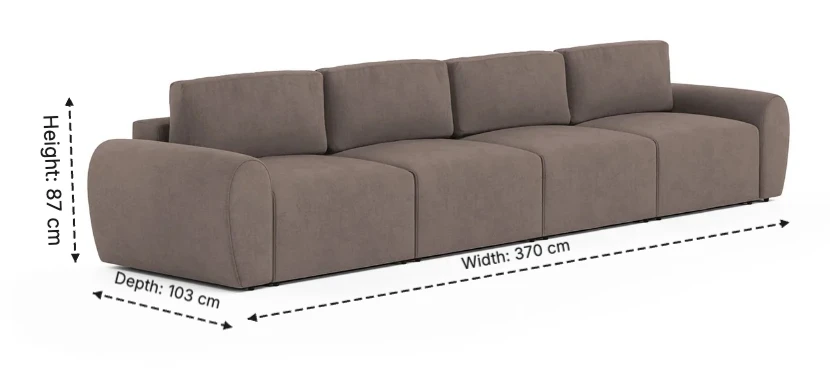
The most expensive sentence in furniture e-commerce is a short one: "It looked smaller online."
Every furniture listing has the dimensions somewhere — a spec table, a bullet point, a line of text under the fold. And yet size-and-fit problems remain one of the most common reasons furniture comes back. The numbers were right there. The buyer just never saw them.
That distinction — between publishing dimensions and making them visible — is what this article is about. A dimension image (the product photo with measurement lines drawn on it) is arguably the hardest-working image in a furniture gallery: it is cheap to make, it answers the buyer's most anxious question, and it defends you against the return that erases the whole margin of the sale.
The Numbers Nobody Reads
Here is the uncomfortable truth about spec tables: buyers don't process them the way sellers assume. "370 × 103 × 87 cm" is not a picture of a sofa — it's a maths problem. To use it, the buyer has to mentally reconstruct a 3D object from three abstract numbers, then place that imagined object into their imagined room. Most people don't do this. They skim, they feel confident or they don't, and they decide.
It gets worse on mobile, where the spec table lives three scrolls below the gallery and competes with reviews, delivery estimates and a dozen other modules. The gallery, by contrast, is the one part of the listing every single buyer looks at.
Humans judge size relationally, not numerically. We know how big a door is, how tall a sofa arm is, how much space a coffee table needs — by reference, not by measurement. A dimension line drawn on the product photo speaks that native language: it converts an abstract number into a visible proportion, anchored to the object itself.
What a Dimension Image Actually Does
Put the same information in the two formats side by side and the difference is stark:
| Dimension image | Spec table | |
|---|---|---|
| Where it lives | In the gallery — seen by every buyer | Below the fold — seen by some |
| Effort to understand | One glance | Mental 3D reconstruction |
| Works on mobile | Yes — it's just an image | Buried under other modules |
| Answers "will it fit?" | Visually, instantly | Only with a tape measure and patience |
| Signal to the buyer | "This seller thought about my room" | Compliance |
None of this makes the spec table optional — marketplaces require it, and careful buyers cross-check it. The point is that the two do different jobs. The table documents; the image communicates. A listing needs both, but only one of them changes behaviour.
Context Is the Second Half
A white-background dimension graphic answers "how big is it?" There is a second question it can't answer alone: "how big is it next to my things?" That's the job of the in-context dimension shot — measurement lines drawn inside a real room scene.
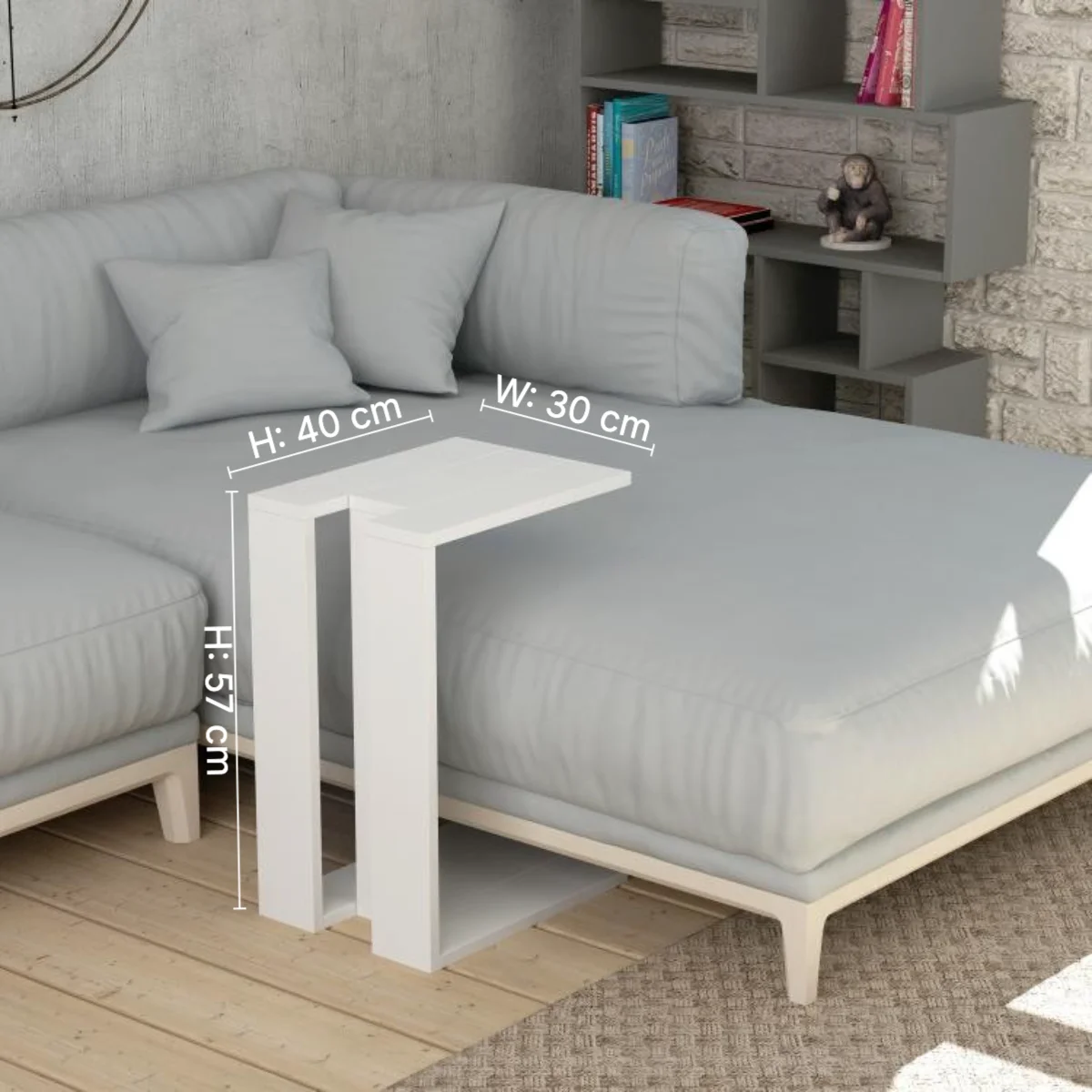
Look at what the scene does that the numbers can't: the 57 cm height doesn't need translating, because it's standing next to a sofa seat. The 40 × 30 cm top reads instantly as "big enough for a laptop and a coffee". The room itself becomes the ruler.
The strongest galleries use both layers: a clean white-background dimension graphic early in the gallery (slot 2 or 3, right after the hero), and an in-context dimension shot among the lifestyle images. The first documents the size; the second makes it felt.
The Returns Math
Furniture has one of the highest return costs in e-commerce. For large items, a single return typically runs $100–$200 once you add outbound and return shipping, inspection, restocking and the real risk that the piece comes back unsellable. Unlike a t-shirt, a returned sofa often can't simply go back on the shelf.
Now run a conservative scenario. A seller shipping 1,000 orders a year at an 8% return rate is handling 80 returns. If even a quarter of those are size-and-fit related — a low estimate for furniture — that's 20 returns, or roughly $2,000–$4,000 a year burned on a problem a single image can attack. Scale that to a 500-product catalog and size-related returns quietly become a five-figure line item.
A dimension image doesn't eliminate size returns. But it converts the worst kind of buyer — the one who guessed — into the best kind: the one who checked. Buyers who have seen the measurements on the photo made an informed decision, and informed decisions come back less. The same logic shows up in disputes: "dimensions were shown in image 2 of the listing" is a much stronger position than "dimensions were in the spec table".
What Our Own Data Says
We can add one data point from our own platform. (Disclosure: OmniRoom is our product, and this figure comes from our usage data.)
When sellers generate AI room scenes on OmniRoom, they can either leave the category's default product size or enter their product's real measurements. The gap in outcomes surprised us: scenes rendered with real dimensions get downloaded at 27% — versus 6% for scenes left on defaults. A 4.5× difference.
The mechanism is simple: when proportions are right, the image is keepable; when they're even slightly off, sellers feel it immediately and discard the render. Buyers run the same instinctive check on your listing photos. Proportion is not a detail — it's the difference between an image that builds trust and one that quietly undermines it.
How to Make a Dimension Image That Works
The format is simple, but the details decide whether it reads at thumbnail size:
Show all three axes. Height, width and depth, each with a clear label and unit. For US marketplaces, show inches (or both cm and inches).
Anchor lines to the product's edges. Arrows should start and end exactly where the product does — a floating line invites doubt about what's being measured.
Keep the typography honest. A clean sans-serif, large enough to read on a phone, dark on light. Never let a label cover a defining feature of the product.
Give it a fixed gallery slot. Slot 2 or 3, immediately after the hero image, on every product — consistency across the catalog is itself a trust signal.
Add the in-context version. One lifestyle scene with dimensions drawn in, placed among the room shots, for the "next to my things" question.
On OmniRoom, both halves of this are built in: the Dimensions tool draws measurement lines with height, width and depth annotations on any product image, and every scene generator asks for your product's real measurements so the AI keeps proportions true in the room itself.
Related reading: What 36,000 AI-staged furniture images taught us · AI builds the dream, editing makes it exact
Related reading: Amazon furniture photography guide · Shopify furniture product page images · Furniture photo angles ranked by download data