Every guide about furniture product photography lists the same angles: front, three-quarter, detail, top-down. What none of them can tell you is which angles sellers actually keep once they see the results — because nobody measures it.
We can. On OmniRoom, furniture sellers generate camera angles from staged room scenes and then download only the images they intend to publish. That download click is a quality vote: it costs a credit, so nobody spends it on an image they won't use. Across 18,929 customer-generated images (February–August 2026, our own team's usage excluded), the votes are in — and the ranking upends some photography folklore.
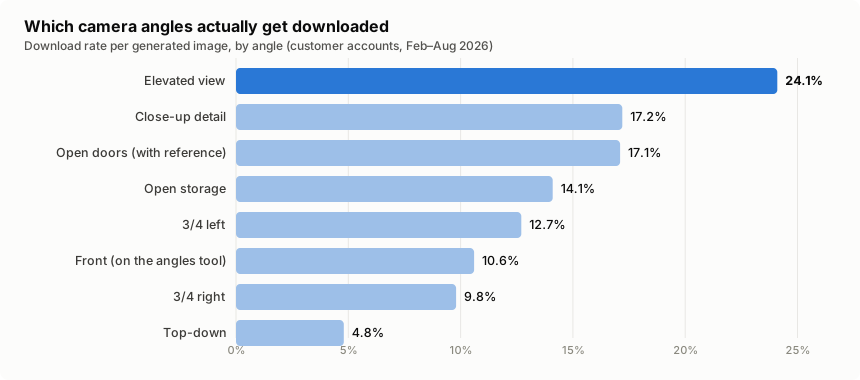
The Ranking: Download Rate by Camera Angle
The fairest metric is the download rate: of all images generated for a given angle, what share did the seller pay to keep?
| Angle | Images generated | Download rate |
|---|---|---|
| Elevated view | 431 | 24.1% |
| Close-up detail | 460 | 17.2% |
| Open doors (with interior reference) | 41 | 17.1% |
| Open storage | 149 | 14.1% |
| 3/4 left | 385 | 12.7% |
| Front (on the angles tool) | 339 | 10.6% |
| 3/4 right | 366 | 9.8% |
| Top-down | 147 | 4.8% |
| 6-grid collage | 14 | 0% |
(Disclosure: OmniRoom is our product and this is our platform data. Method notes at the end.)
Why the Elevated View Wins
The elevated view — shot from slightly above eye level, looking gently down at the piece in its room — converts at 24.1%, a clear length ahead of everything else. It wasn't the most generated angle; it is simply the one sellers keep.
The reason becomes obvious once you think like a buyer instead of a photographer. A straight-on shot shows a product's face. The elevated view answers the buyer's spatial questions in one frame: how deep is the seat, how much floor does it claim, what does the top surface look like, how does it sit relative to the sofa next to it. For a category whose number-one return reason is size-and-fit, the angle that communicates space earns its keep.
If your gallery has room for only one lifestyle angle beyond the hero shot, the data says: make it elevated.
The Close-Up: Where Hesitant Buyers Convert
Second place goes to the close-up detail shot at 17.2% — and it is also the single most generated angle (460 images), so sellers already sense its value. Furniture buyers can't touch the product; the zoomed shot of fabric weave, wood grain, stitching and hardware is where "looks nice" turns into "feels real".
The related open-doors shot — doors and drawers open, ideally with a reference photo of the real interior — lands right behind at 17.1%. Storage furniture buyers want proof of what's inside; showing it is worth a gallery slot for any wardrobe, sideboard or cabinet.
The Front View Paradox
The classic front-on shot converts at just 10.6% on the angles tool — sixth place. Does that mean the front view doesn't matter? The opposite, and this is the finding we almost missed in our own analysis.
When sellers generate a staged room scene, the scene itself is a front-view composition — and those scene downloads (340 of them in this dataset, more than all tool-generated angle downloads combined) are all, in effect, front views. The front view isn't unpopular; it's table stakes. Sellers get their hero front shot from the scene generation step, so by the time they reach the angles tool they're specifically shopping for what the front view can't show.
The lesson for your gallery order: the front-view hero opens the listing, and the angles that follow should add new information — space (elevated), texture (close-up), silhouette (3/4) — rather than restating the hero.
What Doesn't Earn Its Slot
Top-down (4.8%). Useful for rugs and coffee-table styling, nearly useless for seating and storage — most furniture reads as an unrecognisable slab from directly above. Generate it for flat products; skip it otherwise.
The 6-grid collage (0%). Fourteen were generated; not one was downloaded. Marketplaces want individual images they can order and A/B test, not pre-composed mosaics. We removed the option from our own product after seeing this number.
One more behavioural note: about 8 in 10 angle runs customise the default angle selection rather than accepting it as offered. Angle choice is a deliberate, considered decision for sellers — which is exactly why the download data above is trustworthy: it reflects intent, not defaults.
A Practical Angle Playbook
Distilled into a gallery recipe for a typical furniture listing:
1. Front-view hero — from your staged scene; the click-driver.
2. Elevated view — the data's #1 keeper; answers the space questions.
3. Close-up detail — texture and build quality; converts the hesitant.
4–5. Three-quarter left and right — silhouette and depth from both sides.
+ Open doors/storage — mandatory for storage furniture, skip otherwise.
+ Dimension image — measurement lines on the photo; see our dimension images guide for why this one quietly cuts returns.
Method notes: dataset covers customer accounts only (our own team's usage excluded), February–August 2026; download rate = paid downloads of an angle ÷ images generated for that angle. Small-sample rows (open doors, 6-grid) will move as volume grows.
Related reading: What 36,000 AI-staged furniture images taught us · Amazon furniture photography guide · Why visuals sell furniture online